
Barcodes and labels
Library barcode software, from numbering to spine labels.
Barcoding a library usually means three programs: a spreadsheet of accession numbers, a label designer, and the library system that has to match them. Khulla does all three. It's open-source library management software that numbers each copy you add, prints its barcode label, and reads that same barcode back when a member borrows it.
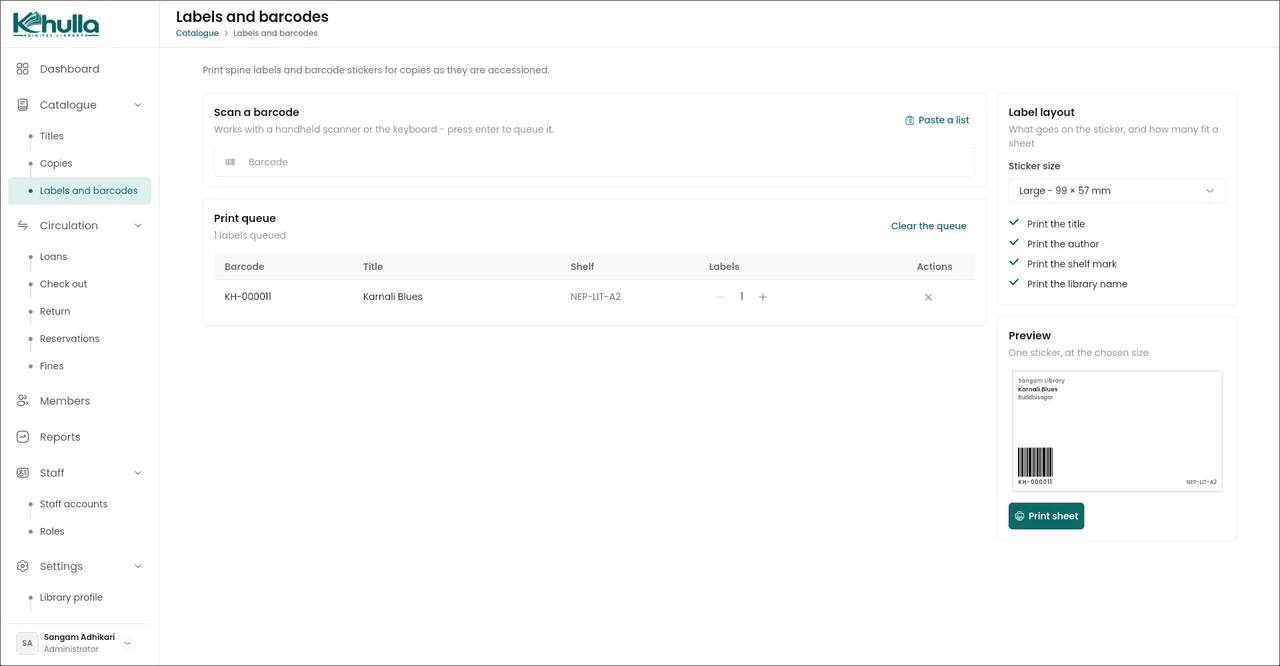
Barcode numbers for every copy
Each physical book is a copy with its own barcode, and each title can have as many copies as you own. Leave a new copy's barcode blank and Khulla gives it the next number in sequence, with a prefix you choose in settings. Books that already have barcodes or accession numbers keep them: type or scan them in. Read how to catalogue a small library.
Spine labels and barcode stickers
Queue the copies that need labels by scanning them, pasting a list of barcodes from a spreadsheet or accession register, or adding a whole shelf from the copies list. Pick a sticker size and what to print on it, check the preview, and print. Labels are laid out on A4 sheets across as many pages as the queue needs, with real Code 128 barcodes.
| Sticker | Made for | Usually carries |
|---|---|---|
| Small, 38 × 21 mm | Spine labels | Barcode and shelf mark |
| Medium, 63 × 38 mm | Accession stickers (the default) | Title, barcode and shelf mark |
| Large, 99 × 57 mm | Property labels for big books | Library name, title, author, barcode and shelf mark |
The title, author, shelf mark and library name can each be switched on or off, on any size.
Scanning at the desk
- Any keyboard-style scanner. USB or Bluetooth, no drivers or setup inside Khulla.
- Check-out by scan. Scan a member's card number, then each copy, and the loan is recorded.
- Returns by scan. Scanning a copy closes its loan and works out any fine.
- No scanner yet? Type the number instead. Everything works from the keyboard.
Questions
Is there open-source software to print library barcode labels?
Yes. Khulla is open-source library software that numbers each copy and prints Code 128 barcode labels on A4 sheets, in three sticker sizes. Because it's part of the library system, the same barcode is what you scan at check-out.
Which barcode scanner works with it?
Any USB or Bluetooth barcode scanner that types like a keyboard, which is nearly all of them. Scan into the check-out screen or the labels screen. Most scanners press Enter after the number for you, so there is nothing else to do.
Can I use the barcodes already stuck on our books?
Yes. A copy's barcode is whatever you type or scan when you add it, so existing accession numbers and barcodes carry over. Khulla only numbers copies you leave blank.
Which barcode type does it print?
Code 128, which handles letters and numbers and is read by ordinary handheld scanners. The number is printed under the bars too, so a copy can still be typed in if a label is scratched.
Can I print labels in Nepali?
Not yet. Printed labels use Latin characters, so a label for a Nepali book shows its barcode and shelf mark but not its title. The catalogue itself works in Nepali.
Print your first sheet of labels
Open the demo, queue a few copies on the labels screen and print a sheet to see how the stickers come out. It all works in the browser or on your own computer.
Want a hand setting it up?
Message us on WhatsApp (+977 981-9102869) or email info@sangamadhikari.com. See contact for what to tell us.